

Coupons let your partners turn your Stripe coupons into their own promo codes. You connect Stripe and choose which coupons partners may use; each partner rep then creates a personalized code their customers can redeem at checkout. Every generated code — and how often it's been redeemed — shows up on the Coupons page.
What a coupon is here
Two Stripe concepts sit behind this feature:
A coupon is the discount you define in Stripe — for example 20% off or $10 off. You create and manage coupons in Stripe, not in Partner.io.
A promo code is the shareable code a customer types at checkout to apply a coupon. On Partner.io, promo codes are created by your partner reps from the coupons you make available to them, so each rep gets a code that's attributed to them.
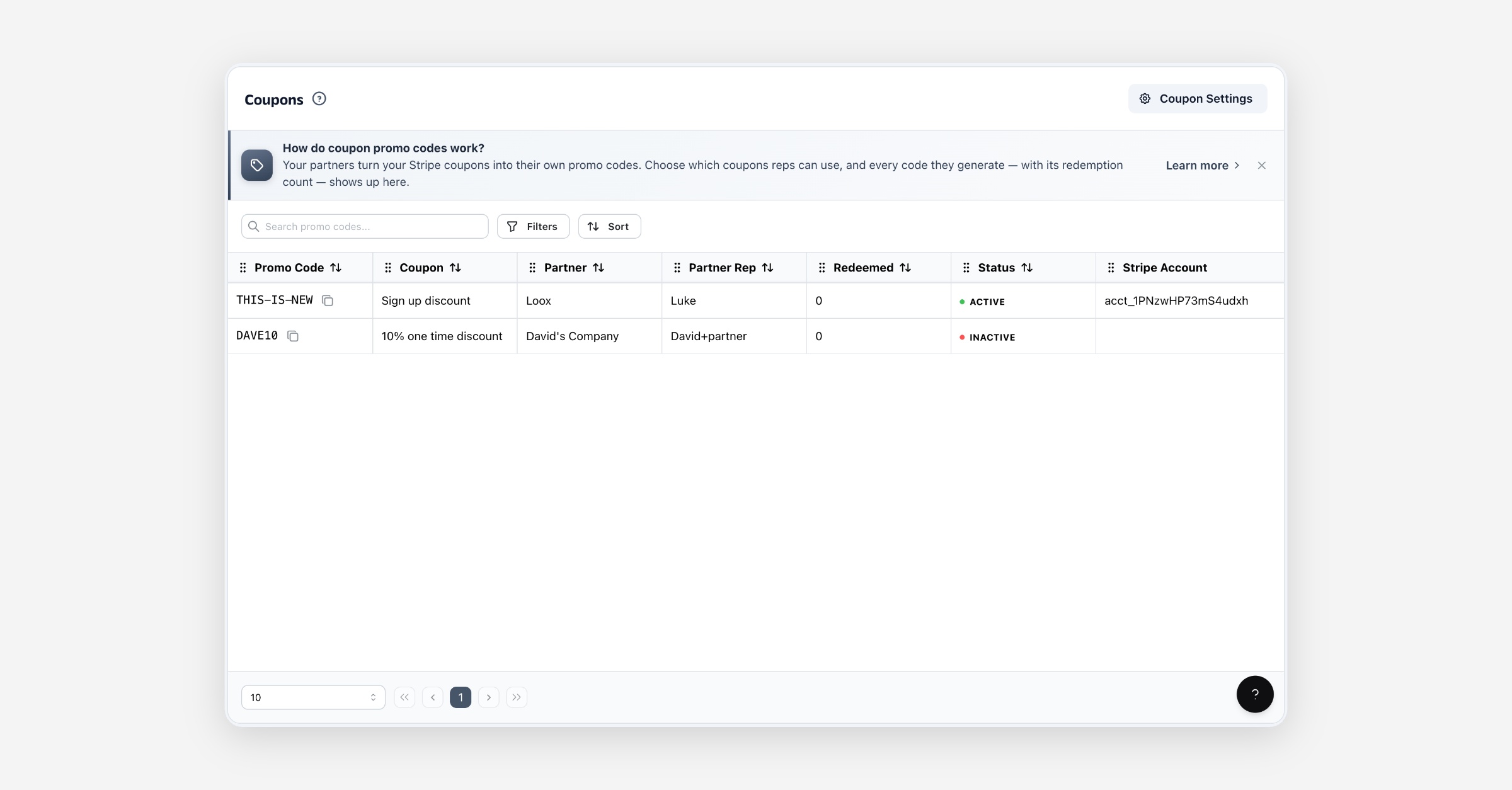
The Coupons page is where you see every promo code your partners have generated, which coupon it applies, and how many times it's been redeemed.
Before you start
Coupons run on Stripe. The Coupons area appears in your navigation once you've connected Stripe from Integrations. Because promo codes are created by partner reps, you'll also want partners in your program who can generate them.
Choosing which coupons partners can use
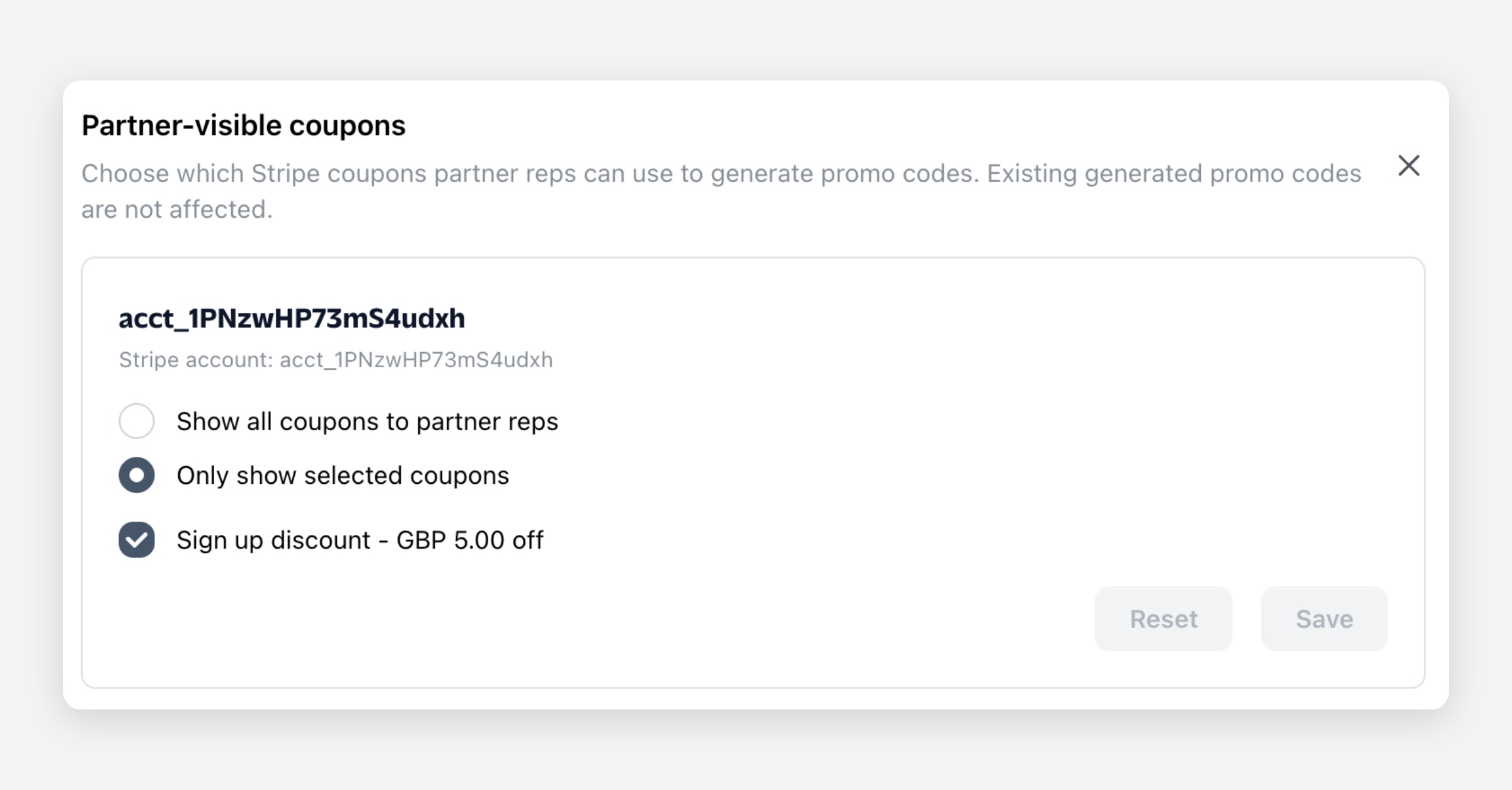
Use Coupon Settings (top-right of the Coupons page) to control which of your Stripe coupons partner reps can build promo codes from:
All coupons — reps can generate a code from any coupon on your connected Stripe account.
Selected coupons — reps only see the coupons you pick.
Changing this only affects which coupons reps can use going forward. Promo codes that have already been generated are not affected.
How partners generate a promo code
A partner rep creates a promo code from their partner portal:
They open the coupons they have access to — the ones you've made available.
They pick a coupon and enter a custom code (letters, numbers, and hyphens, up to 50 characters). The code is stored in upper case and must be unique across your account, so no two partners can claim the same one.
Partner.io creates the matching promotion code in Stripe and lists it on your Coupons page.
The rep then shares that code with their audience. When a customer applies it at checkout, Stripe records the discount and the redemption count updates here.
The Coupons page
Each row is one promo code a partner has generated:
Column | What it shows |
|---|---|
Promo Code | The code customers redeem at checkout (with a copy button). |
Coupon | The Stripe coupon it applies — the underlying discount. |
Partner | The partner the rep belongs to. |
Partner Rep | The rep who generated the code. |
Redeemed | How many times the code has been redeemed, synced from Stripe. |
Status | Active or Inactive — whether the code can currently be redeemed. |
Stripe Account | The connected account the code lives on, if you have more than one. |
Filter the list by coupon, partner, partner rep, or status to find a specific set of codes.
Keeping in sync with Stripe
Promo codes stay in sync with Stripe automatically:
Redemptions and status update as customers redeem codes and as codes are toggled on Stripe.
Coupon details (name and discount terms) refresh when you edit the coupon in Stripe.
Deleting a coupon in Stripe marks its generated promo codes Inactive, so they can no longer be redeemed.
Disconnecting the Stripe integration marks its generated promo codes Inactive too. They stay on the page for your records, but can't be redeemed until you reconnect.
A partner rep can also activate or deactivate their own codes from their portal — a deactivated code stops working immediately.
Permissions
You (the admin) connect Stripe, choose which coupons partners can use, and see every generated promo code across your connected Stripe accounts.
Partner reps see only the coupons you've made available and can generate and manage their own promo codes. They can't see other reps' codes.
FAQ
Do I create promo codes for my partners? No — you make coupons available, and each partner rep creates their own code. This keeps every code attributed to the rep who shares it.
Can two partners use the same code? No. Each code must be unique across your account, so a code a rep claims can't be reused by anyone else.
Why is a code showing as Inactive? It was deactivated by the rep or in Stripe, the underlying coupon was deleted in Stripe, or the Stripe integration was disconnected.
Where do redemption counts come from? Directly from Stripe. Partner.io reflects Stripe's count for each promo code.