

The Register & Refer widget is a single embeddable form that does two things at once: a visitor signs up as a partner and, in the same submission, refers their first lead. You style it here to match your site and get a snippet to paste onto your page. Every submission creates the partner — and a lead attributed to them — straight in Partner.io.
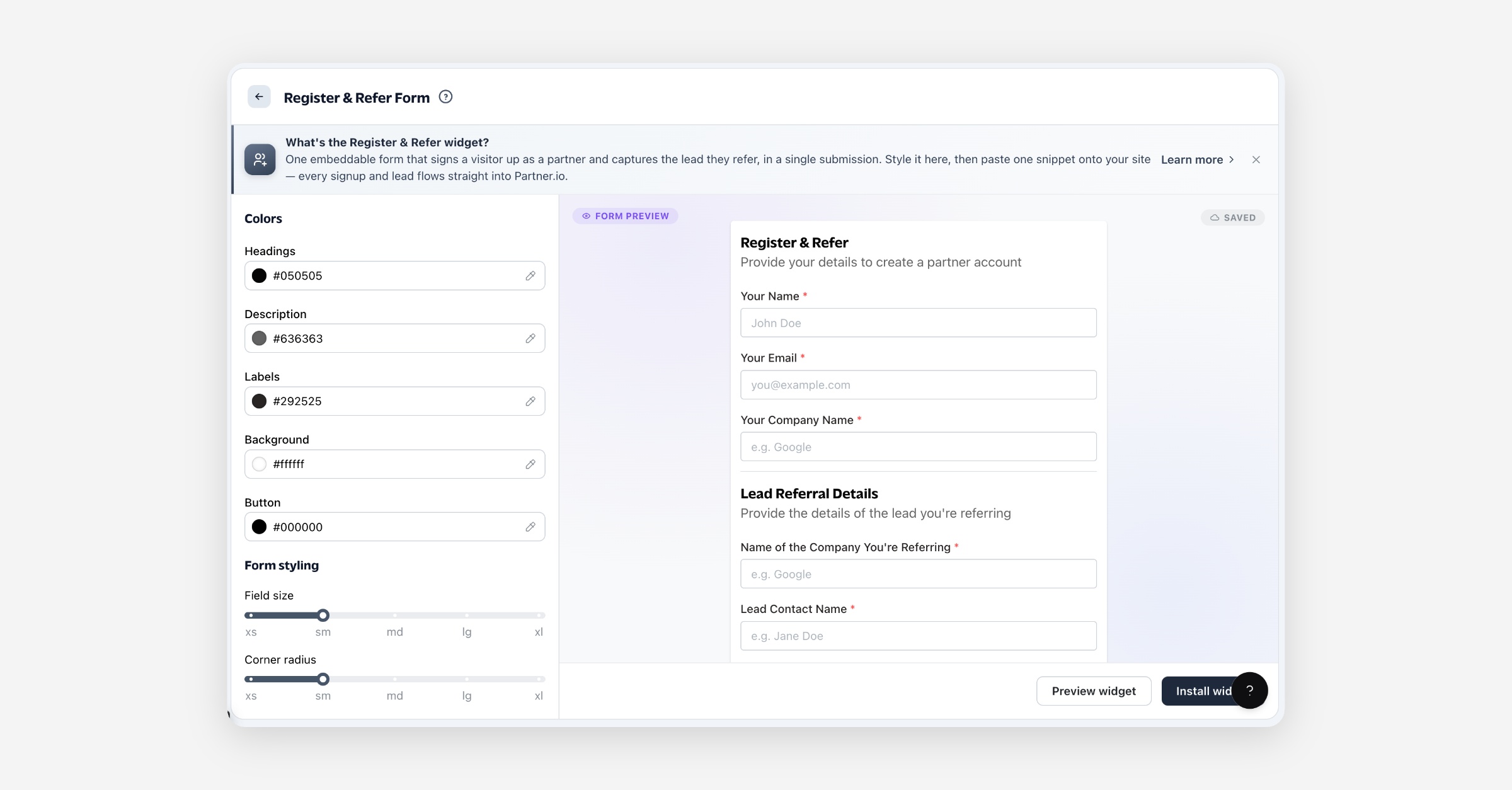
What the Register & Refer widget is
It's a public form you embed on your own website. The top half collects the visitor's own details and creates a partner account for them; the bottom half collects the details of the lead they're referring. On submit, both are created at once — the new partner, their organization, and a referred lead attributed to that partner, which lands in your Leads. Styling changes here only affect the embedded form; they never change the data it captures.
Before you start
Nothing needs to be set up first — the form works out of the box, with default styling, the moment you embed it. The only things you need are the snippet (below) and somewhere on your website to paste it.
What the form asks is managed elsewhere, and the widget picks up changes without you re-embedding:
Your Partner Application — the sign-up half asks whatever that form asks, so the widget and your portal's application page stay in step. Manage it under Portal → Partner Application; see Partner application form.
Your Lead Referral Form — the referral half asks whatever that form asks, so the widget and your referral page stay in step. Manage it under Leads → Referral Form; see Lead referral form.
Required questions — a question marked required on your Lead Referral Form is required here too, and the form won't submit until it's answered.
Styling the form
Use the panel on the left; the preview updates as you go and every change saves automatically.
Colors
Control | What it does |
|---|---|
Headings | Color of the two section headings. |
Description | Color of the helper line under each heading. |
Labels | Color of the field labels. |
Background | Background color of the form card. |
Button | Color of the submit button. |
Form
Control | What it does |
|---|---|
Field size | Height of the inputs (xs–xl). |
Corner radius | How rounded the card and inputs are (xs–xl). |
Padding | Space inside the form card (xs–xl). |
Shadow | Depth of the card's drop shadow (none, xs–xl). |
Button
Control | What it does |
|---|---|
Button size | Height of the submit button (xs–xl). |
Installing it on your site
Select Install widget to open the snippet, then Copy snippet and paste it into your website's HTML wherever you want the form to appear — for example on a "Become a partner" or "Refer a lead" page. The snippet is a single element plus a script tag.
The leads it captures flow in live. Each submission reaches Partner.io in real time — the new partner and their referred lead appear without you touching the snippet.
Styling is baked into the snippet. Your colors and sizes are written into the snippet's attributes, so if you restyle the form here, copy the updated snippet and replace the one on your site.
Use Preview widget at any time to see the full form rendered exactly as visitors will, in a sandboxed browser frame.
What happens on submit
A partner is created from the visitor's name, email, and company — as a new partner organization in your program.
A lead is created from the referral details and attributed to that new partner, landing in your Leads for you to work.
Your lead questions are captured alongside the standard referral fields — whatever your Lead Referral Form asks.
FAQ
Do I need to configure anything before embedding it? No. The form ships with default styling and works immediately. Styling and the questions on your Lead Referral Form only refine it.
What does one submission create? Two things: a partner account for the visitor and a referred lead attributed to that partner. Both appear in Partner.io as soon as the form is submitted.
Do my own lead questions show on the form? Yes. The referral section asks whatever your Lead Referral Form asks, and you don't need to re-embed when you change it.
Do I need to update the snippet when a lead comes in? No — submissions flow in live. You only re-copy the snippet after you restyle the form, since appearance is baked into it.
Can I match it to my brand? Yes — set the heading, description, label, background, and button colors, plus field size, corner radius, padding, and shadow. The preview shows your changes live.