

The Event Calendar widget embeds your events on your own website — a live calendar visitors can browse and register from without leaving your site. Your events come from Partner Events; on this page you style the calendar to match your brand and get a snippet to paste onto your site. Once it's embedded, it stays in sync on its own.
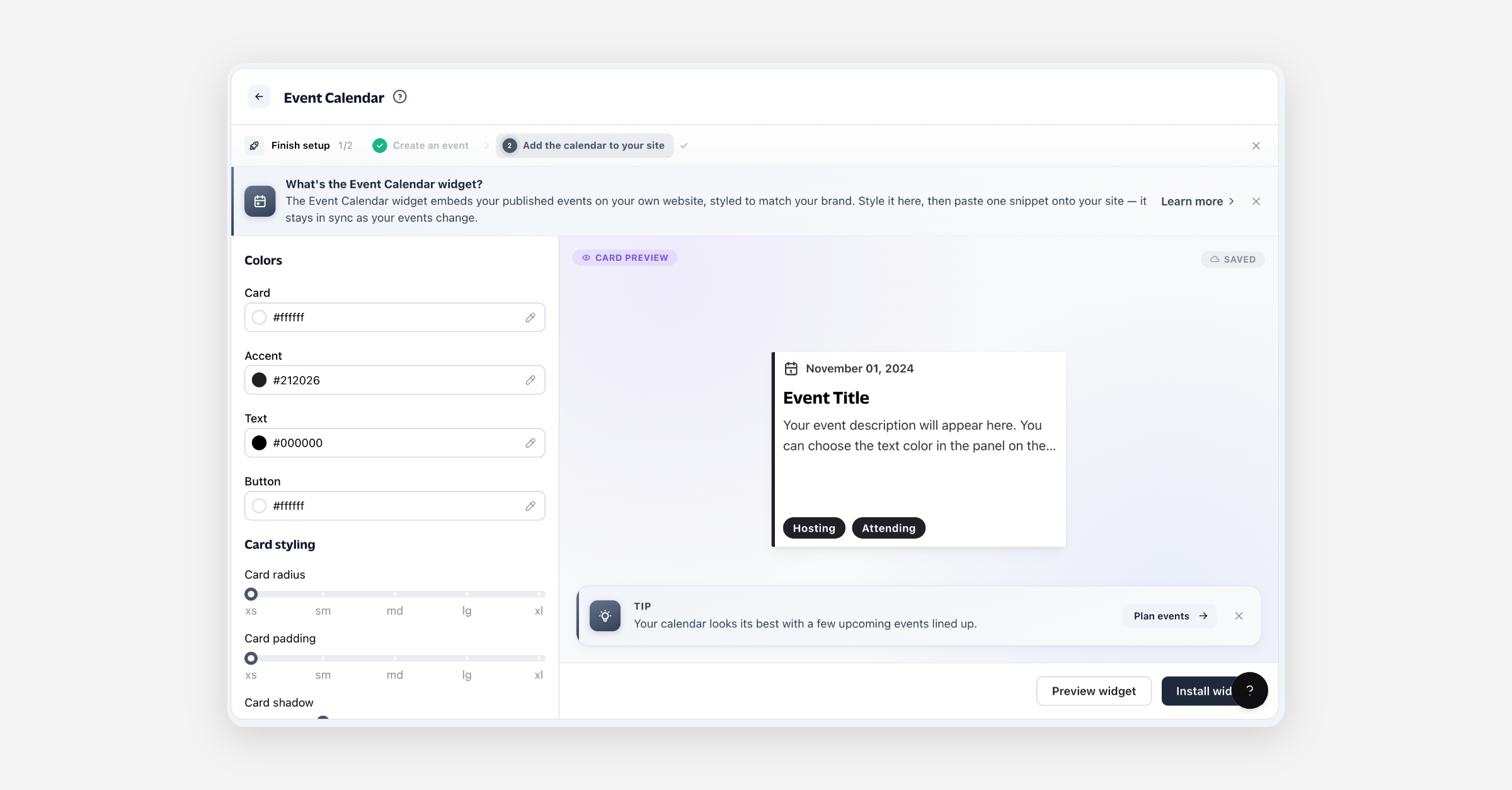
What the Event Calendar widget is
It's an embeddable version of your event calendar. The events themselves live in Partner Events — this page doesn't create or edit events, it controls how your published events appear on your site and gives you the code to place them there. Style changes here only affect the embedded widget; they never change your events.
Before you start
The widget shows your published, upcoming events, so you'll want at least one such event in Partner Events before you embed it — otherwise the calendar renders empty. You'll also need somewhere to paste the snippet: any page of your website where you can add HTML.
Styling the calendar
Use the panel on the left; the preview updates as you go and every change saves automatically.
Appearance
Control | What it does |
|---|---|
Card | Background color of each event card. |
Accent | Accent color — the card's left edge and tag badges. |
Text | Color of the event title, date, and description. |
Button | Color of the register / call-to-action button. |
Card radius | How rounded the card corners are (xs–xl). |
Card padding | Space inside each card (xs–xl). |
Card shadow | Depth of the card's drop shadow (xs–xl). |
Layout
Control | What it does |
|---|---|
Grid columns | How many events sit side by side (1–4). |
Grid rows | How many rows show before the load-more button (1–4). |
Grid spacing | Space between cards (xs–xl). |
Subheading fallback | Text shown under the date when an event has no tags — for example We're Hosting. |
Load more button | Let visitors load more events beyond the first grid. Turn off to cap the calendar at the rows above. |
Installing it on your site
Select Install widget to open the snippet, then Copy snippet and paste it into your website's HTML wherever you want the calendar to appear. The snippet is a single element plus a script tag — for example on your "Events" or "Community" page.
Your events stay live automatically. The script loads your latest events each time the page is viewed, so new and edited events appear without you touching the snippet.
Styling is baked into the snippet. Your colors, layout, and other appearance settings are written into the snippet's attributes, so if you restyle the widget here, copy the updated snippet and replace the one on your site.
Use Preview widget at any time to see the full calendar rendered with your live events, exactly as visitors will.
Which events show
The widget always reflects your live events in Partner Events:
Published, upcoming events only — drafts and past events don't appear, and an event drops off automatically once its start date passes.
Soonest first — events are ordered by start date.
Updates on their own — publish a new event or edit an existing one and the widget reflects it within a few minutes. No re-embedding.
FAQ
Do I create events here? No. Events are created and managed in Partner Events. This page only styles and embeds the calendar that displays them.
Which events appear in the widget? Your published events with a start date in the future, soonest first. Drafts and events that have already happened aren't shown.
Do I need to update the snippet when my events change? No — events load live each time the page is viewed, so new and edited events appear automatically.
What about when I restyle the widget? Yes — styling is baked into the snippet, so after you change the appearance here, copy the updated snippet and replace it on your site.
Why is my calendar empty? You don't yet have a published, upcoming event. Create or publish one in Partner Events and it will appear.
Can I match it to my brand? Yes — set the card, accent, text, and button colors, plus corner radius, padding, shadow, and the grid layout. The preview shows your changes live.