

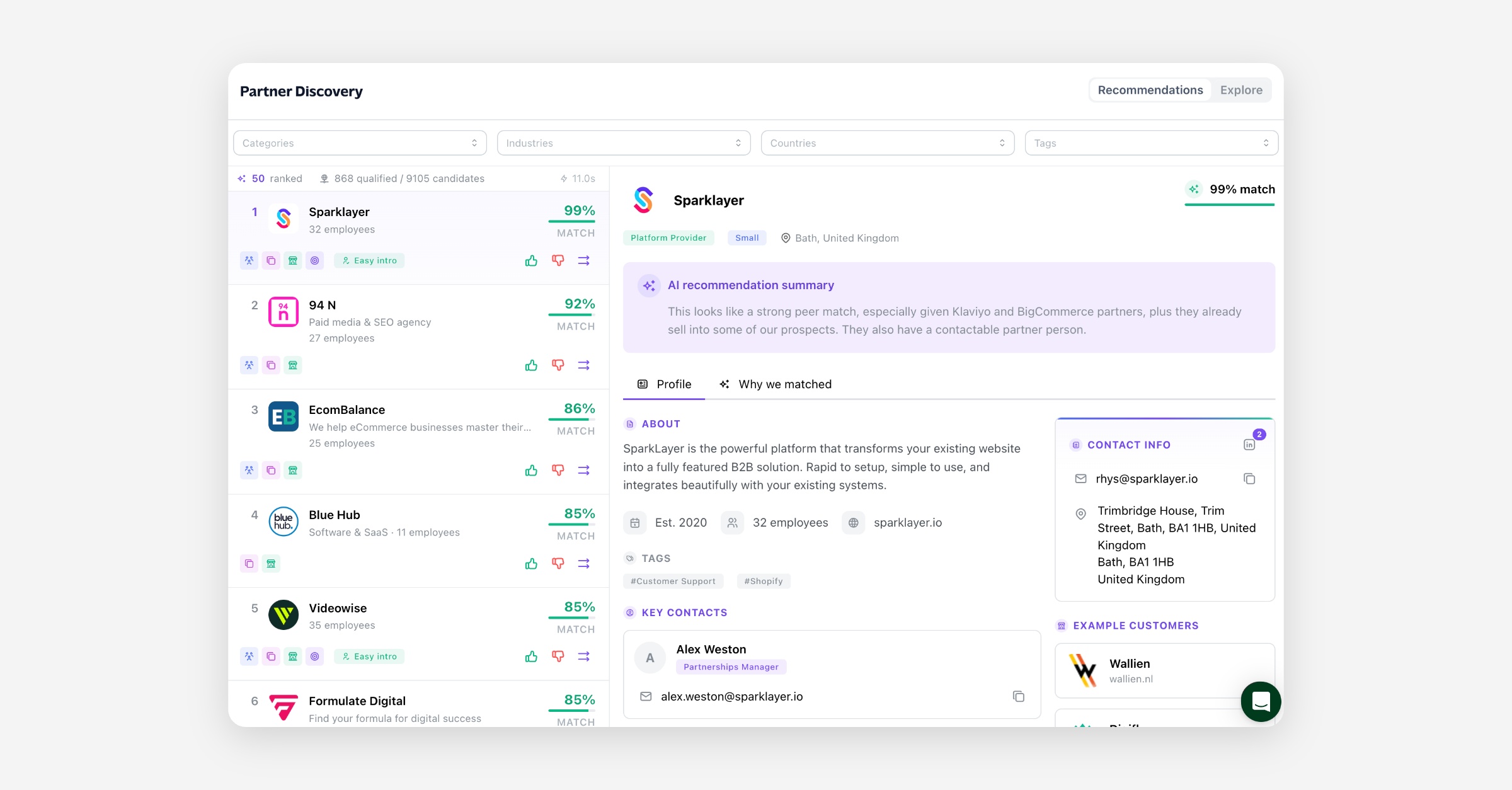
Partner Discovery helps you find companies worth partnering with. It searches Partner.io's company database and gives you two ways in: Recommendations, a ranked list of the companies that fit you best, and Explore, the database to search yourself. When a company looks right, Start prospecting adds it to your recruitment Pipeline, ready to work.
What Partner Discovery is
Finding new partners usually means research: who sells to the customers you want, who works with companies like yours, who has someone you can actually talk to. Partner Discovery does that research from Partner.io's database of companies and the relationships between them, and puts the results next to your Pipeline.
It has two views:
Recommendations | Explore | |
|---|---|---|
What it shows | The top 50 companies ranked for you | The company database |
Ranked | Yes, by match score | No |
Companies you already know | Left out | Included, and marked |
Filters | Category, industry, country and tag | Category, industry, country and tag |
Search | No | Yes |
Why a company is there | Match score, evidence, ranking signals and an AI summary | — |
Company profile | Yes | Yes |
Start prospecting | Yes | Yes |
Both views lead to the same place. A company you want to recruit goes into your partner Pipeline, where you work it like any other prospect.
Before you start
Partner Discovery is available on plans that include it. You'll find it under Grow › Partner Discovery in the sidebar. If you don't see it, it isn't enabled for your account.
Recommendations draw on your program. They take your existing partners and your Pipeline into account, so adding both gives them more to work from.
Recommendations
Recommendations ranks the companies that would make the best partners for you. It uses your company, the partners already in your program, and the prospects in your Pipeline. Every company listed is new to you: your own company, your existing partners, and anything already in your Pipeline are left out.
You can narrow the list by category, industry, country or tag.
What each recommendation tells you
Match score — how strongly the company fits, based on network overlap, endorsements, partner fit and pipeline signals. The list is ranked by it.
AI recommendation summary — a short written explanation of why the company was recommended.
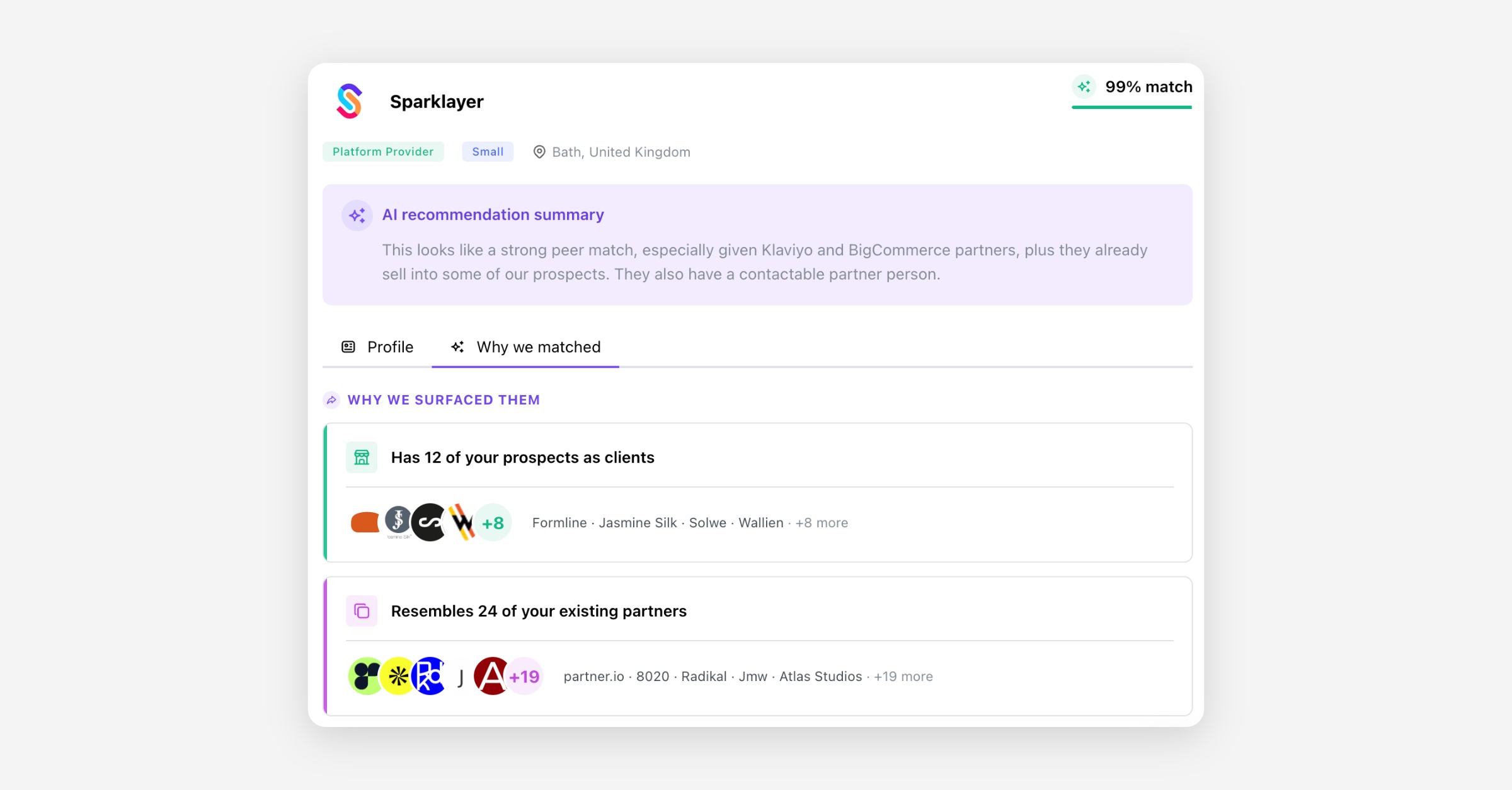
Why we surfaced them — each kind of evidence that brought the company up, with the companies it came through.
Ranking signals — the factors that moved the company up or down the list, each with how much it counted and a short explanation.
Easy intro — the company has someone in a partnerships role with an email address or phone number on file.
Reachability — whether there's a Partner contact (someone in a partnerships role with an email or phone on file), and whether there's Any reachable contact at the company.
Each recommendation also has the company's full profile. See Company profiles below.
Rating a recommendation
Rate a recommendation a Good match or a Bad match, with an optional reason for a bad match. Ratings help improve recommendations. They don't change the list you're looking at.
Explore
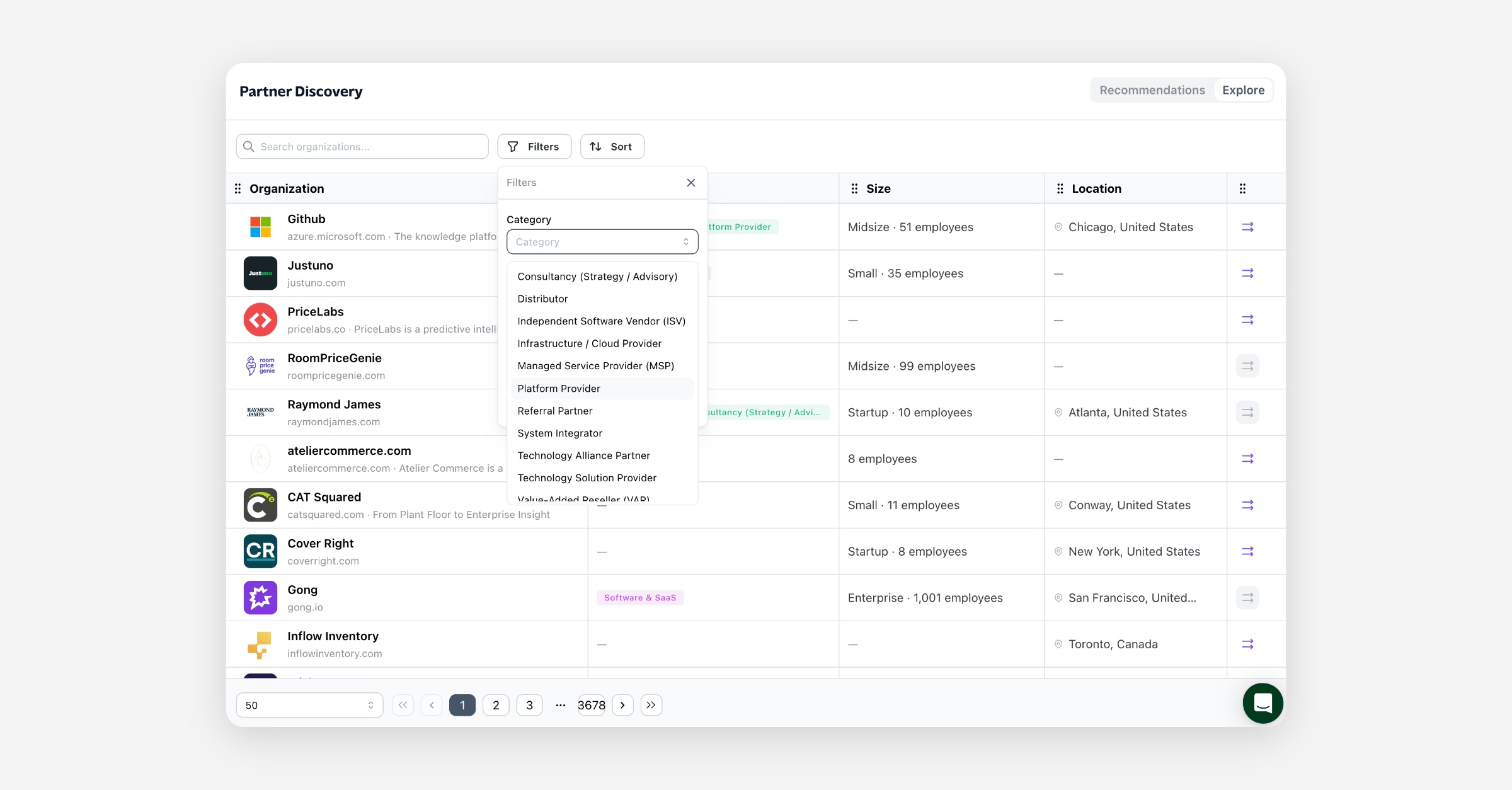
Explore is the company database to search, filter and sort yourself. Unlike Recommendations, it doesn't rank companies or leave out the ones you already know: a company that's already your partner is marked Existing partner, and one already in your Pipeline is marked In your pipeline.
You can search it, filter it by category, industry, country or tag, and sort it by name. For each company it shows:
Column | What it shows |
|---|---|
Organization | Name, website domain and tagline. |
Specialty | The company's main industry and categories. |
Size | Company size and number of employees. |
Location | City and country. |
Company profiles
Both views show the same profile of a company:
About — what the company does.
Key facts — its size (Startup, Small, Midsize or Enterprise), number of employees, the year it was founded, and its website.
Tags — how the company is tagged in the database.
Key Contacts — people at the company, with their role, email, phone and social profiles.
Contact Info — the company's own email, phone, social profiles and address.
Example Customers — some of the company's customers.
Start prospecting
Start prospecting adds a company to your recruitment Pipeline. Partner.io creates a card for the company in the first stage of your Pipeline, with its top key contact's name and email address. The card isn't assigned to anyone. From there you work it like any other Pipeline prospect.
It needs a contact with an email address. A company with no key contact email on file can't be added.
It doesn't contact anyone. Nothing is sent to the company. Reaching out happens from your Pipeline, when you're ready.
It doesn't create a partner. The company becomes a Pipeline prospect, not a partner in your program.
In Explore, a company you already work with links to its partner profile or its Pipeline card instead.
Not the Partner Directory widget
Partner Discovery is for finding new companies to recruit. It's unrelated to the Partner Directory widget (Program › Embed › Partner Directory), which shows your existing partners on your own website. It has its own guide, Partner Directory widget.
FAQ
Where do the companies come from? From Partner.io's database of companies and the relationships between them. Partner Discovery doesn't list your own records: your partners and Pipeline prospects appear only as markers in Explore.
Why don't I see any recommendations? If you've applied filters, try removing some. Recommendations also draw on your partners and your Pipeline, so adding both gives them more to work from.
Why isn't a company I know in Recommendations? Recommendations leaves out your existing partners and your Pipeline prospects, and shows the top 50 only. Use Explore to find any company.
Why can't I start prospecting a company? None of its key contacts has an email address on file, so there's no one to add to the Pipeline card.
Does Start prospecting email the company? No. It only adds the company to your Pipeline.
Does rating a recommendation change the list? Not the list you're looking at. Ratings are used to improve recommendations.
Can I see why a company was recommended? Yes. Every recommendation comes with an AI summary, and its Why we matched tab shows the evidence and ranking signals behind it.