

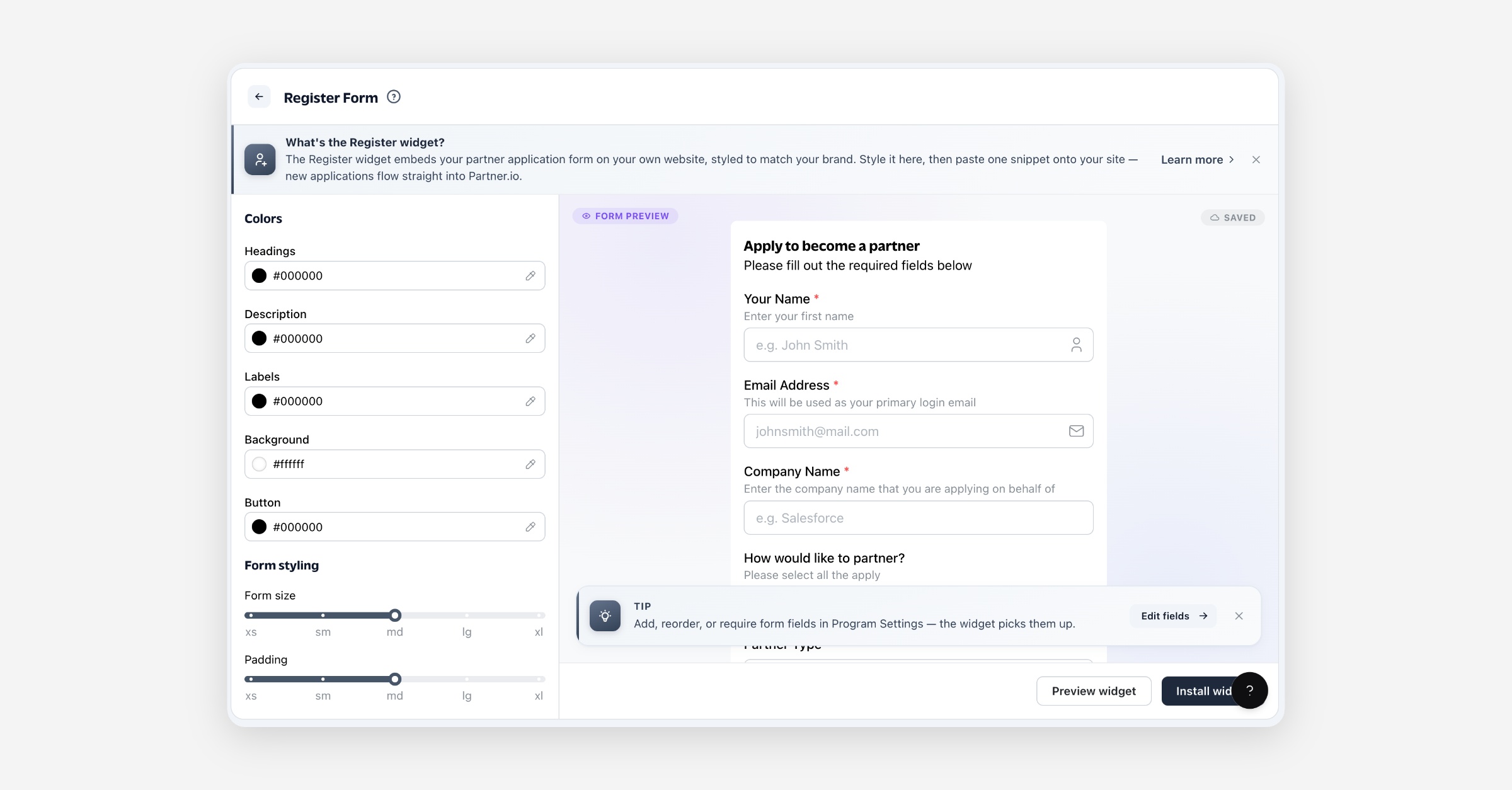
The Register widget embeds your partner application form on your own website — visitors apply to your program without leaving your site, and every submission lands in Partner.io as a new applicant. On this page you style the form to match your brand and get a snippet to paste onto your site.
What the Register widget is
It's an embeddable version of your partner application form. The questions on the form — name, email, company, and any others — come from your Partner Application under Portal; this page doesn't add or change questions, it controls how the form looks and gives you the code to place it on your site. Applications submitted through the widget flow straight into Partner.io.
Before you start
Nothing is required to embed the form — a new account already has a working application form asking the details a partner record can't be built without, so the widget is usable right away. Two things are worth doing first if you haven't:
Review your form in Portal → Partner Application: add the questions you need, order them, and mark any required. Whatever that form asks is what the widget shows.
Have somewhere to paste the snippet: any page of your website where you can add HTML.
Styling the form
Use the panel on the left; the preview updates as you go and every change saves automatically.
Colors
Control | What it does |
|---|---|
Headings | Color of the form's heading. |
Description | Color of the intro text under the heading. |
Labels | Color of each field's label. |
Background | Background color of the form card. |
Button | Color of the submit button. |
Form styling
Control | What it does |
|---|---|
Form size | Overall sizing of the fields (xs–xl). |
Padding | Space inside the form card (xs–xl). |
Corner radius | How rounded the card and fields are (xs–xl). |
Shadow | Depth of the card's drop shadow (none, xs–xl). |
Button size | Size of the submit button (xs–xl). |
Installing it on your site
Select Install widget to open the snippet, then Copy snippet and paste it into your website's HTML wherever you want the form to appear — for example on a "Become a partner" or "Apply" page. The snippet is a single element plus a script tag.
Form changes flow through live. The form reads your Partner Application each time the page is viewed, so adding, reordering, rewording or requiring a question updates the embedded form without you touching the snippet.
Styling is baked into the snippet. Your colors and sizing are written into the snippet's attributes, so if you restyle the form here, copy the updated snippet and replace the one on your site.
Use Preview widget at any time to see the full form rendered exactly as visitors will.
FAQ
Where do applications go? Every submission lands in Partner.io as a new applicant, ready for you to review and approve.
How do I change which questions the form asks? In Portal → Partner Application. Add, remove, reorder, reword and require questions there; the widget shows whatever that form asks. See Partner application form.
Do I need to update the snippet when I change my form? No — the questions load live each time the page is viewed, so changes appear automatically.
What about when I restyle the form? Yes — styling is baked into the snippet, so after you change the appearance here, copy the updated snippet and replace it on your site.
Can I match it to my brand? Yes — set the heading, description, label, background, and button colors, plus sizing, radius, padding, and shadow. The preview shows your changes live.