

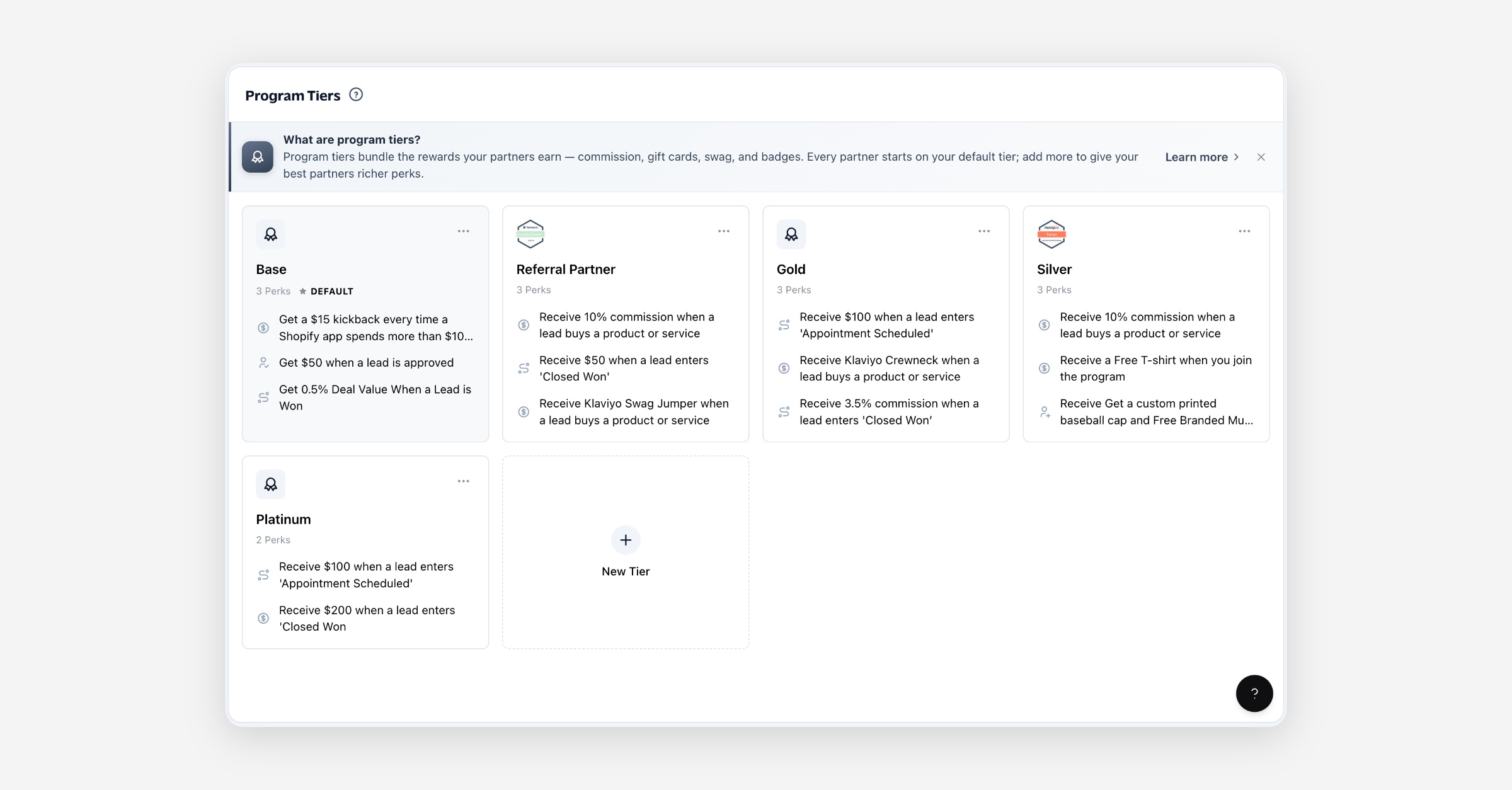
Program tiers are how you package the rewards your partners earn. A tier is a named bundle of perks — each perk pairs something a partner does with something they get in return. Assign a tier to a partner and they earn every perk it contains.
Every partner belongs to exactly one tier, so tiers are also how you differentiate your program: keep everyone on a single set of terms, or reward your best partners with richer perks on a higher tier.
Prerequisites
None. Every company starts with a Standard default tier, so the feature works the moment you open it — there's nothing to switch on first. You only need partners to assign tiers to them, but you can build and refine tiers before then.
Anatomy of a perk
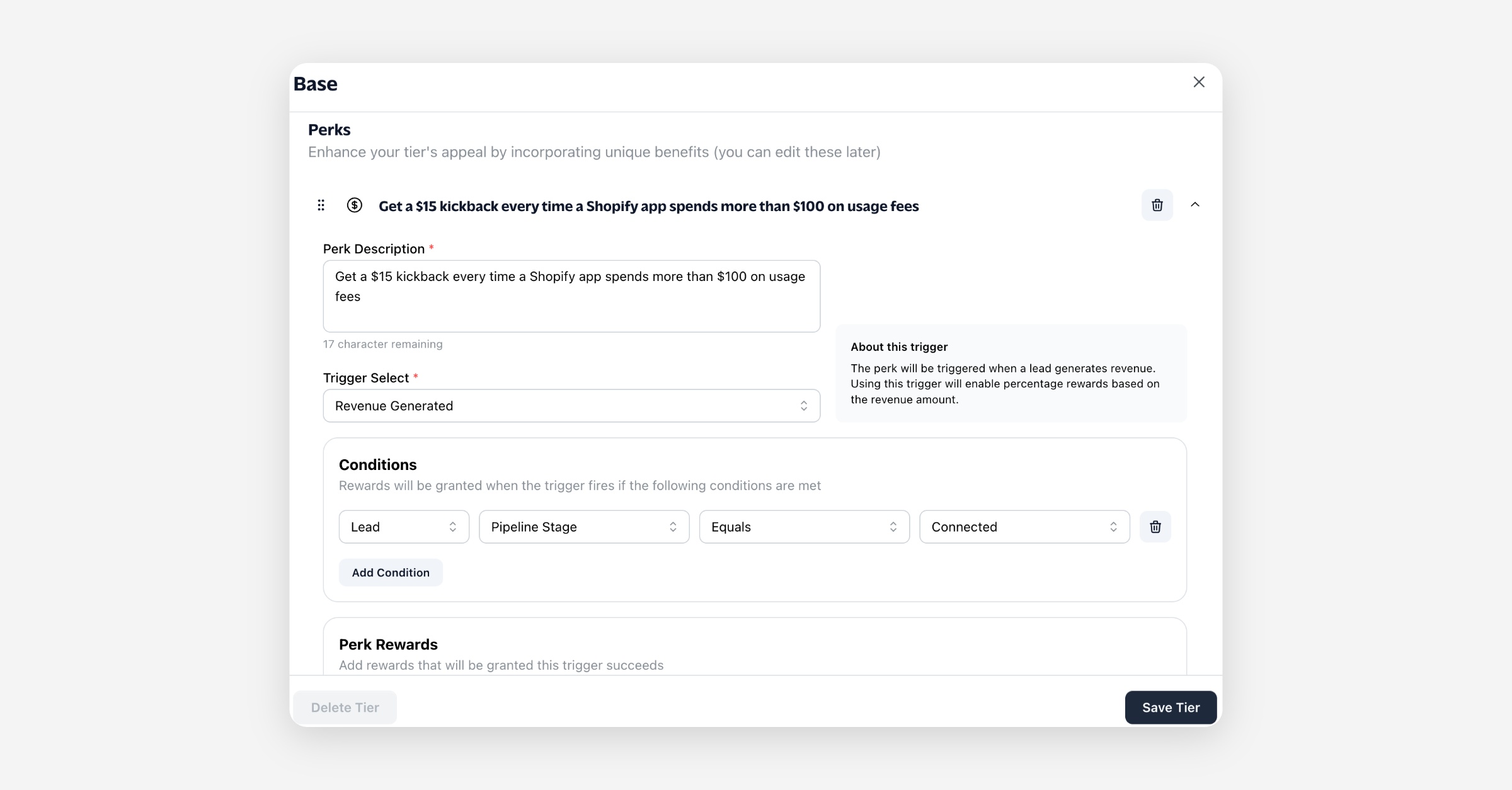
A tier holds any number of perks. Each perk has three parts:
Trigger — the event that earns the perk (what the partner does).
Reward — what the partner receives when the trigger fires.
Conditions (optional) — extra rules that narrow when the perk applies, so one trigger can pay out differently in different situations.
Triggers
Trigger | Fires when |
|---|---|
Revenue Generated | A payment is recorded against a lead the partner referred. |
Lead Approved | A lead the partner referred is approved. |
Pipeline Stage Entered | A referred lead moves into a pipeline stage. |
Partner Rep Created | A new partner rep is added under the partner. |
Course Completed | The partner finishes an assigned course. |
Badge Earned | The partner earns a badge. |
Sub Partner Earns Commission | A partner beneath this one (in a multi-tier program) earns commission. |
Rewards
Reward | What the partner gets |
|---|---|
Percentage | A commission set as a percentage of deal value, with an optional payout delay. |
Monetary | A fixed cash amount, with an optional payout delay. |
Gift Card | A gift card from a supported provider. |
Swag | An off-platform perk such as branded merchandise. |
Badge | A badge granted to the partner. |
A single perk can grant more than one reward — for example, a commission percentage and a badge.
The default tier
One tier per company is the default, marked with a Default badge and highlighted on the page. The default tier:
Is assigned automatically to every new partner (unless their partner type sets its own tier — see below).
Can't be deleted.
Can't have its default status removed directly. To change which tier is the default, set another tier as default instead — the previous one steps down automatically.
Your starting Standard tier comes with one perk — a 5% lifetime commission on revenue generated — which you're free to edit or replace.
How partners get a tier
A partner is placed on a tier automatically when they're created:
If the partner's partner type specifies a tier, that tier is used.
Otherwise the company default tier is used.
You can move a partner to a different tier at any time from the partner's page.
Creating and managing tiers
Create a tier — use the New Tier card on the Program Tiers page, give it a name, and add perks.
Edit a tier — open any tier card to change its name, badge, and perks.
Duplicate a tier — from a tier's menu, choose Duplicate to copy it (including its perks) as a starting point. The copy is named "… (Copy)" and is never the default.
Delete a tier — a tier can be deleted once no partners are on it. Its partners must be moved to another tier first.
Worked example
You want to pay a standard 10% commission but reward partners who complete onboarding:
Edit the Standard tier so its commission perk pays 10% on Revenue Generated.
Create a Certified tier. Duplicate Standard as a starting point, then add a second perk: a Badge reward on the Course Completed trigger.
As partners finish onboarding, move them to Certified so they carry the badge alongside their commission.
Legacy tiers
Tiers created under the previous version of the program are labelled Legacy. They open in their own editor and can't be duplicated. Create new tiers to take advantage of triggers, conditions, and the full range of rewards.
Limits & notes
A company always has exactly one default tier.
Deleting a tier is blocked while any partner is still assigned to it.
Legacy tiers are read through their dedicated editor and support fewer options.
FAQ
Do I have to create tiers to start paying partners? No. The Standard tier already pays commission, and new partners land on it automatically.
What happens to a partner's tier if I delete that tier? You can't delete a tier that still has partners — move them to another tier first.
Can one perk give more than one reward? Yes. Add multiple rewards to a single perk, such as a commission and a badge.
Can I have different terms for different partners? Yes — that's what tiers are for. Put partners on different tiers to give them different perks.